THEIA II user manual

INTRODUCTION

We would like to thank you for purchasing a THEIA II connected watch and wish you lots of fun with it. This watch offers you useful orientation data thanks to its highly accurate GPS sensor and its barometric pressure sensor for altimetric accuracy and barometric data. Please find below the information you'll need to fully configure your THEIA II watch.

If you have any doubt, please don't hesitate to contact us by e-mail at: info@airn.ch

Before getting started:

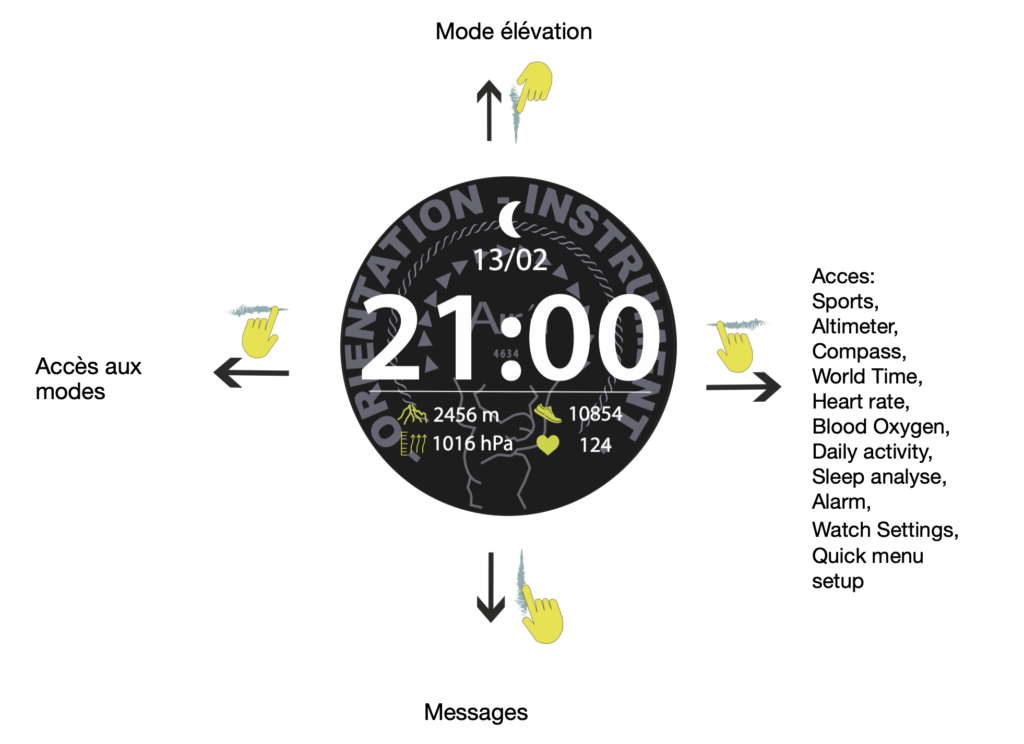
Your watch has an AMOLED touchscreen that allows you to select a number of functions. What's more, the crown on the top right can be turned to make selections, either by long or shortpress, or by rotation. Finally, the button on the bottom right can also be pressed long or short to make selections.

For more information please send an email to : info@airn.ch

Button function

Short press on the crown returns to the previous page in all cases.

Long press on crown turns watch off or on.

Short press on bottom button takes you to activity mode.

Long press on bottom button 3 seconds unlock the screen under sports mode.

Long press on bottom button 4 seconds triggers return to starting point.

Long press on bottom button 10 seconds triggers SOS mode.
THEIA II screen: Button function
StartGetting startedSwitch on THEIA II, install the airn connect app on iOS or Android, create your account and pair the watch.StartCharging and batteryCharging THEIA II takes about 2 hours.StartThe airn connect appWhat the airn connect app does for THEIA II: alarms, world clock, messages, firmware updates, AGPS, Strava, SOS contact, account and data.OutdoorsSport modes and GPSThe six THEIA II sport modes, how long the GPS signal takes, return to start with a 4-second press, screen lock in rain and what happens when the signal is lost.OutdoorsMapsTHEIA II has 4 GB for maps, with Switzerland, Provence-Alpes-Cote d'Azur and north-east and north-west Italy preloaded.OutdoorsRoutesHow to create a route in the airn connect app, choose the map type and activity, and send the route to your THEIA II watch.OutdoorsAltimeter, elevation, compassHow to calibrate the THEIA II barometric altimeter, use elevation mode without GPS to save battery, and calibrate the compass.OutdoorsSOS modeHow SOS works on THEIA II: hold the bottom button for 10 seconds, the watch asks your phone to call your saved contact within 5 seconds, and what changes on iPhone.EverydayHeart rate, oxygen, activity, sleepHow to read heart rate (about 15% tolerance), blood oxygen, daily steps, calories and kilometres, and deep and light sleep on THEIA II.EverydayWatch menus and notificationsThe THEIA II icon menu (countdown, activity history, map directory, chronometer, calendar, offline maps, storm alert), notifications, world time and alarm.EverydaySettingsAll THEIA II settings: find a phone, brightness, screen time, dials, always-on display, do not disturb, power save, language, vibration, reset, SOS, quick dial change and quick access menu.SupportCare and glass replacementHow to clean THEIA II and its pressure sensors, rinse it after seawater, change the strap with the pin bars and fit a new protective glass.SupportWarrantyThe THEIA II limited warranty: 2 years from activation for the watch, 2 years for accessories, 180 days for straps, refunds within 30 days on airn.ch, and what is not covered.SupportPrivacy policyThe Airn privacy policy: what data is collected, how it is used and shared, third-party providers, security, storage, retention and your rights.